

State and county governments often rely on a large enterprise resource planning (ERP) system to manage finances across multiple departments. But what happens when a pension fund, lottery or public guardian has requirements that the central system wasn’t designed to handle?
These agencies may end up working around system limitations, maintaining legacy software or paying for features they don’t need. None is an ideal long-term solution.
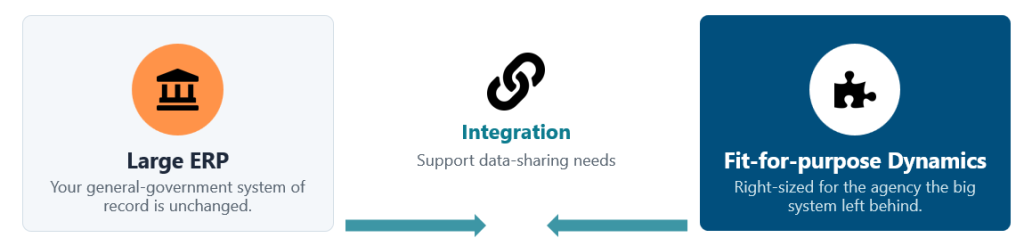
Many agencies find success using Microsoft Dynamics 365 to meet their specific needs while integrating with the larger system for shared financial data and reporting.
The goal isn’t necessarily to replace the state’s ERP. It’s to find a system that fits the work the agency actually does.
Why don’t specialized agencies fit into a statewide ERP?
Large government ERP implementations are typically designed around common functions such as payroll, purchasing, budgeting and general ledger. That makes sense when you’re supporting dozens of departments with similar requirements.
Specialized agencies often operate differently. Their accounting, reporting and day-to-day processes can be quite different from those of the broader government organization.
We see this challenge across several types of agencies:
- Pension funds: Member accounting, fund accounting and actuarial requirements that may be managed independently of the county or state.
- Lotteries: Revenue-generating operations with different transaction volumes and procurement needs than other government departments.
- Public guardians and corrections facilities: Financial management for individuals in the care of the agency, including managing trust accounts and personal funds.
- Planning and economic development departments: Grant management, reimbursements and reporting tied to specific programs.
Some agencies were excluded from a larger ERP implementation. Others chose not to participate because the system wasn’t a good fit. And some are still using older software that has become increasingly difficult to maintain.
The challenge is finding a system that supports what the agency actually does, without duplicating everything already handled by the state or county.
What happens when the ERP doesn’t meet your needs?
When the software doesn’t support a required process, staff have to find another way to get the work done. Over time, those workarounds can become part of everyday operations.
Common issues include:
- Manual work: Staff rely on spreadsheets, re-enter information and reconcile data across systems.
- Delayed reporting: Finance teams spend time gathering and validating numbers instead of giving leaders timely information.
- Limited visibility: Decision-makers may be working with outdated reports rather than current financial data.
- Growing maintenance risks: Older systems can become harder to support as vendors phase out updates and experienced technical resources become harder to find.
For agencies running Microsoft Dynamics GP, there are also important support deadlines to consider. Microsoft has published December 31, 2029, as the end of mainstream support and April 30, 2031, as the end of security updates.
Agencies still running Dynamics GP or Dynamics SL should understand the support timeline for their specific version and start planning their next steps well in advance. A migration takes time, from evaluating options and preparing data to testing and training staff.
Waiting until a system becomes difficult to support can leave an agency with fewer options and less time to make a considered decision.
Do you need to replace the state’s ERP to get a better fit?
Not necessarily.
A specialized agency can usually run its own ERP alongside the central government system. The agency manages its transactions and business processes in the system that meets its needs, while sharing the required financial data with the larger organization.
This approach lets each system do what it does best. The state or county retains the financial information it needs, and the specialized agency doesn’t have to force its processes into a platform designed for a different purpose.
Microsoft Dynamics 365 can support this model, with integration designed around the agency’s requirements and the systems already in place.
It also provides access to familiar Microsoft tools, including Entra ID for identity management, Power BI for reporting, and Power Apps and Power Automate for extending business processes. Copilot and other AI capabilities may also be useful, depending on the application and the agency’s needs.
For teams already using Microsoft 365, that familiarity can make adoption easier.
Business Central or Dynamics 365 Finance: Which is right for your agency?
Microsoft offers two ERP options worth considering for specialized public sector organizations: Dynamics 365 Business Central and Dynamics 365 Finance & Supply Chain Management.
Both support financial management, but they serve different levels of complexity.
Dynamics 365 Business Central |
Dynamics 365 Finance & Supply Chain Management |
|
|---|---|---|
| Best suited for | Individual agencies and lean finance teams | Larger agencies with more complex requirements |
| Key capabilities | Core financials, reporting and workflow approvals | Advanced financial management, fund accounting, purchase requisitions, project accounting and compliance controls |
| Typical implementation | Approximately 4–6 months | Around a year or longer, depending on scope |
As a starting point, Business Central is often worth evaluating when an agency has a relatively small finance team and straightforward requirements. Dynamics 365 Finance & Supply Chain Management may be a better fit when the accounting structure, controls, reporting or other business processes are more complex.
User count can be one consideration, but it shouldn’t determine the decision on its own. The agency’s requirements, integrations, compliance obligations and future plans all matter.
An implementation partner can help assess those factors before recommending a platform.
What does a right-sized ERP look like in practice?
A county pension fund: Dynamics SL to Business Central in six months
The Ventura County Employees’ Retirement Association (VCERA) offers a practical example of how this approach can work.
VCERA manages retirement benefits in Ventura County, California, operating separately from the county government. Its existing Dynamics SL system had reached end of life, and the team was dealing with manual processes, fragmented information and limited reporting. Adding modern capabilities, including ACH payments, was also difficult.
The team evaluated SAP and Workday but found that both offered more than it needed. As VCERA’s CTO explained when discussing the decision:
“Why are we paying all this money for something where we can’t even use a third of it?”
Business Central provided a better fit for VCERA’s requirements.
OnActuate began the implementation in January 2026, and VCERA went live in July 2026 – on time, on budget and within scope.
The move has delivered several improvements:
- Less manual processing: Built-in automation and workflow approvals have reduced the need for manual steps.
- More reliable data: Information previously maintained outside Dynamics SL is now brought together in one system.
- Better financial visibility: The team has access to current financial information that wasn’t previously available in the same way.
- A familiar working environment: The Microsoft interface helped staff adapt to the new system.
The right ERP should match an organization’s actual requirements and give it room to move forward without paying for capabilities it won’t use.
Five questions to ask before replacing your ERP
If your agency has been running the same system for a decade or longer, start with these questions before choosing a replacement.
1. Have your requirements changed?
List the processes your current system handles well, where staff rely on workarounds and what the agency needs to do differently. Separate essential requirements from features that would simply be nice to have.
2. What’s the full cost?
Look beyond software licensing. Include implementation, integrations, data migration, training and ongoing support when comparing options.
3. What do you need the new system to accomplish?
Define the outcomes that matter to your team. These might include faster financial reporting, fewer manual processes, better auditability or easier access to information.
4. How does the project fit with your broader IT plans?
Consider how the new ERP will work with existing finance, payroll, reporting, identity and other business systems. Coordinate with the central IT team early, especially if the agency needs to share data with a statewide or countywide platform.
5. How much time do you have?
Check the support timeline for your current system and build in time to evaluate options, plan the migration, test the new environment and train staff.
Answering these questions will give you a clearer basis for comparing platforms and planning a realistic implementation.
Where does AI fit for a small public sector team? ✨
AI doesn’t have to mean a large transformation project. For agencies already considering an ERP upgrade, it can be an opportunity to reduce some of the manual work that takes up a small team’s time.
For example, the Payables Agent in Business Central can monitor a mailbox for vendor invoices, read the invoice details and prepare a purchase invoice for review. Staff still review and approve the draft, keeping people involved in the process.
Before introducing AI, agencies should understand how a feature works, what data it uses, what permissions apply and where human review is needed. Availability and functionality can vary by product, configuration and licensing.
Starting with a specific, repetitive task is often more practical than trying to introduce AI across the organization all at once.
Find the right ERP for your agency
Specialized agencies don’t necessarily need the same ERP as the rest of their state or county. They need a system that supports their financial processes, meets their reporting and compliance requirements, and works with the broader government technology environment.
OnActuate works with state and local government organizations to modernize legacy systems, including migrations from Dynamics GP and Dynamics SL to Microsoft Dynamics 365. Our public sector experience helps agencies evaluate their options, plan implementations and work through the practical details of connecting systems.
Want to learn more?
Watch our recent discussion with Microsoft and VCERA on how Microsoft Dynamics can complete your ERP strategy.
If you’re ready to discuss your agency’s current system and requirements, book, time with us. We’ll help you identify which Dynamics 365 option is worth evaluating, based on what your agency needs.